Telephone: 01939 550040

Support

IMPORTANT: Protect Your Security

We will never telephone you to initiate a remote session unless pre-arranged. If you are unsure of the identity of the caller, do not authorize any remote connections to your device.

Simple Remote Support Pricing

£66.00

Includes the first 30 minutes of support.
Additional time is charged at £1.20 per minute thereafter.
Secure payments via Card or Account Invoice. Price includes VAT.

What is Remote Support?

It allows our expert team to solve software issues over the internet. We can observe and fix problems instantly without the need for an engineer visit or bringing your device to the workshop.

Privacy Guaranteed

Privacy is our core principle. We use one-time use codes. Once the session ends, we cannot reconnect unless you provide a brand new code. You stay in control throughout.

During Your Session

  • Please close any sensitive files or personal documents before we begin.
  • You can observe every move our support member makes.
  • Your mouse and keyboard inputs will always override ours.
  • You can stop the session at any time with one click.
View our full Privacy Policy →

Connecting to Us Guide

Step 1

Head to www.islonline.com/join or www.islonline.net. Enter the session code and click “Join“.


Step 2

Click “Run” to open ISL Light Client.

Step 3

Click “Join” to join the session.

Step 4
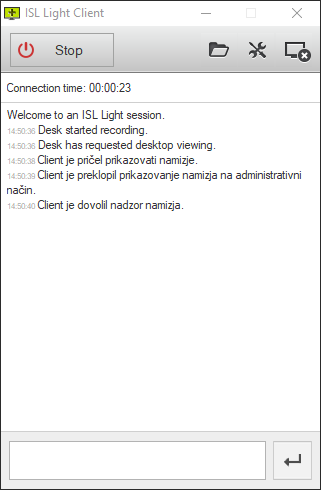
ISL Light is now running and you are connected with operator.

macOS

Step 1

Head to www.islonline.com/join or www.islonline.net. Enter the session code and click “Join“.

Step 2

Run ISL Light Client.dmg file.


Step 3

Double click “ISL Light Client” icon in the window that opens.


Step 4

Click “OK” in the security prompt to allow the ISL Light Client to start.

Step 5

Click “Join” to join the session.


Step 6

ISL Light Client is now running and you are connected with operator.

Linux

Step 1

Head to www.islonline.com/join or www.islonline.net. Enter the session code and click “Join“.


Step 2

Save the .zip file to your computer.

Step 3

Right-click the .zip file and extract it.

Step 4

Double click the ISL Light Client to run it.

Step 5

Click “Join” to join the session.

Step 6

ISL Light is now running and you are connected with operator.
error: Content is protected !!